Do you run ads and promote your business on Facebook or Instagram?
The new Apple iOS 14 guidelines (iOS 14 update) and restrictions have a direct impact on your ad campaigns that are also served on Apple (i.e., iOS) devices.
Our Facebook and Instagram user statistics show that in Switzerland, up to 60% of users access social media via an iPhone (iOS system).
Apple has announced that it will release the changes to iOS 14 during the week of April 26, 2021. Apple’s changes will have a negative impact on your business if you send events using the Facebook Pixel or SDK.
You may notice a difference in your ad reports when Apple releases the iOS 14 changes.
We’ll summarize the changes for you and explain how you should adjust your Facebook and Instagram advertising strategies in light of these changes.
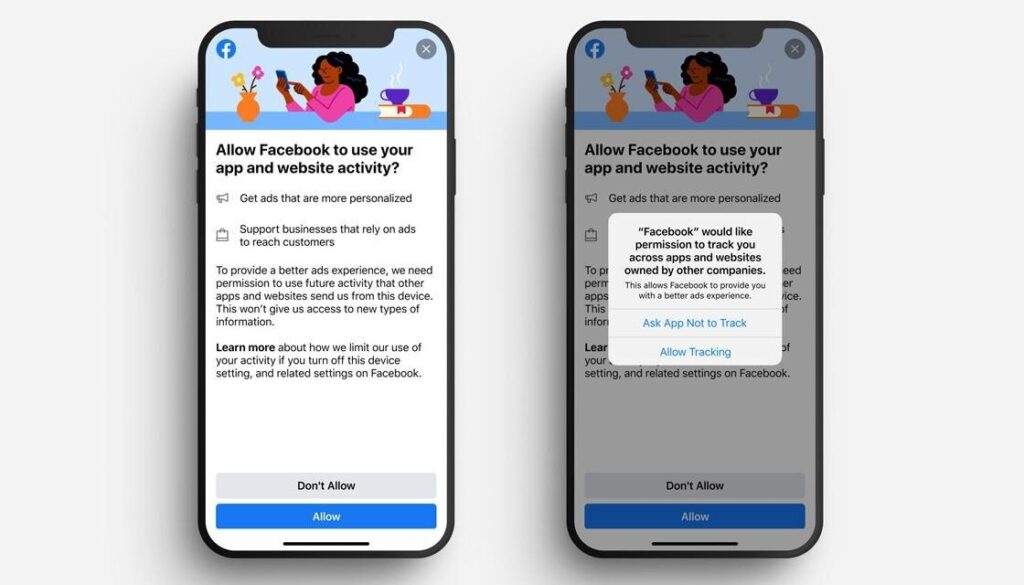
A preview of the two prompts that will be sent to iPhone users. Source: Facebook / Apple
Changes in iOS 14
Apple’s new iOS 14 guidelines are organized into three main pillars:
- All apps (such as Facebook and Instagram) must submit information about their app’s data collection practices through Apple Store Connect
- Apps available on the App Store, including Facebook and Instagram, must ask users for permission through Apple’s App Tracking Transparency framework if they want to use trackers.
- Facebook and other platforms will have to use a new framework that restricts, aggregates, and delays reporting on events.
This results in limitations in the data for website and app events.
Guide: Website Events and Conversions in Your Facebook and Instagram Campaigns
You should take the following steps to ensure that you can continue to optimize your campaigns as desired:
-
Verify Domain
If these domains are not verified, you cannot make any changes to the domains’ web conversion events.
-
Use a maximum of eight conversion events per domain
Your domains are configured with up to 8 events from your existing Facebook Pixel, and Facebook assigns an initial priority to your events based on their historical significance to your business.
-
Anticipate changes to the attribution window and update automated rules as needed
You must now use a 7-day click-through and a 1-day (partial) view-through attribution window. Aggregated event measurement is a method for measuring ad performance that processes web events from logged-out devices to help you run effective ad campaigns while respecting customers’ choices regarding ad tracking within the Facebook platform.
To ensure you’re fully prepared, you can set up Web Events as explained by Facebook.
Guide: App Events and Conversions in Your Facebook and Instagram Campaigns
-
Update the Facebook SDK to the latest version (8.1)
SDK stands for Software Development Kit and enables the seamless integration of a website or app with Facebook. Examples of what you can do with the Facebook SDK include: Facebook login functionality, sharing Facebook content, and social plugins.
-
Use SKAdNetwork
To enable measurement for app install ads, advertisers who use the App Events API and do not have the Facebook SDK must use SKAdNetwork.
SKAdNetwork is Apple’s privacy-friendly method for attributing impressions and clicks to iOS app installations. It shares conversion data with advertisers without revealing user- or device-level data. Soon, it will be harder than ever to track Apple device owners at scale, and when that happens, there’s a chance that SKAdNetwork will be the next-best option.
-
The conversion schema must be configured
All app marketers who use an app-based business tool should plan to configure this element.
-
Implement ATE
To instruct Facebook to limit data usage on an event-by-event basis, the “Ad Tracking Enabled” (ATE) flag should be implemented.
-
Run campaigns through a Facebook Ads account
It isn’t absolutely necessary, but it would be helpful to run all app install campaigns for iOS 14 through a Facebook Ads account.
-
Restructuring Campaigns
You are allowed nine campaigns per app and five Facebook ad sets per campaign, all of which must have the same optimization goal
These tips will help you prepare for the changes in iOS 14 involving the Facebook Pixel.
The solutions for addressing Apple’s iOS 14 changes will soon take effect in your ad account. We recommend that you complete these tasks now.
More information about the Facebook Pixel and tracking update: